
Academic Advising
Welcome to Virginia Western! We look forward to working with you to achieve your educational goals. One of the many benefits of choosing Virginia Western is our dedicated team of academic advisors who will work with you to ensure you move smoothly and efficiently through your educational journey. Academic advisors assist with selecting proper courses, interpreting curriculum requirements and assessing academic progress.
At Virginia Western, academic advising is offered by a team of faculty and staff members consisting of:
- New Student Advisors: New Student Advisors, who are assigned alphabetically, work in the Enrollment Center to assist new students. Meet the New Student Advisors
- Program Advisors: These advisors have offices located in/near each academic school and advise returning students. Once you declare a major, you’ll also have a Faculty Advisor who can be found in the Navigate app. Meet the Program Advisors
As a new student, you should meet with your New Student Advisor prior to the start of the first semester. Once your first semester begins, you’ll transition to your Program Advisor. Schedule an Academic Advising Appointment
Want to keep up with progress toward your educational goals?
Use the advisement report to know what classes to take, see your degree plan broken out by semester, view class options and track your degree progress. To access your advisement report:
- Log in to the Student Center (see Technology Tools below).
- Click Academic Records & Progress.
- Click My Academic Requirements.
Technology Tools
virginiawestern.edu
The Virginia Western homepage — virginiawestern.edu — is your gateway for important college information and updates, from dates and deadlines, policies and procedures, and school closings and delays.
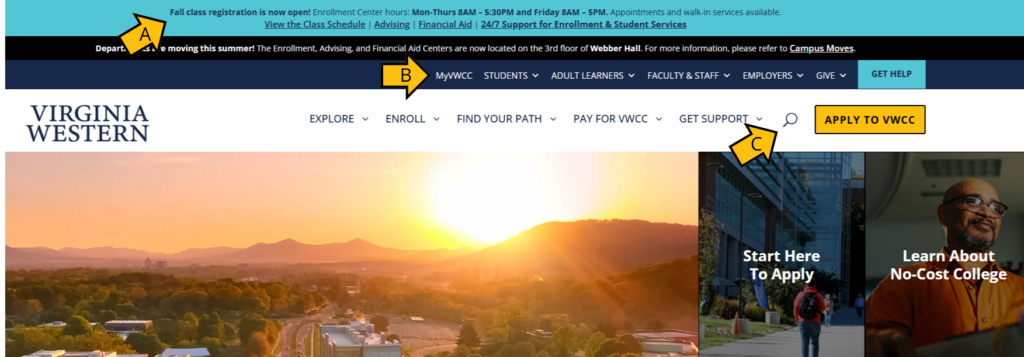
- Important information and updates appear in the banner.
- Access MyVWCC
- Search the site.
MyVWCC
When you login to MyVWCC, you will gain access to multiple apps needed to ensure you’re successful at Virginia Western.
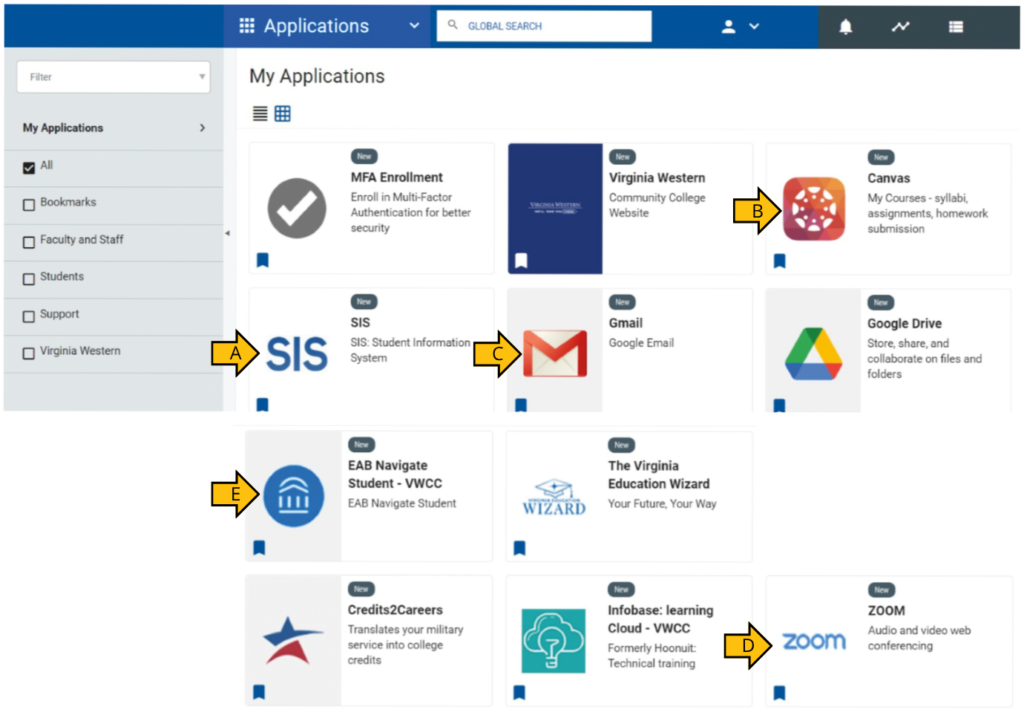
- SIS – Student Information System: Enroll in, drop or withdraw from classes, view your class schedule, request a transcript, view your grades, pay your tuition and complete other tasks that involve your personal information and academic record.
- Canvas: Access course information such as your syllabus and assignments.
- Gmail: Access your Virginia Western email account where all college communication will be routed. Once you enroll in classes, your email will be activated.
- Zoom: Connect virtually with video and audio conferencing.
- Navigate: Schedule and manage appointments with your advisors, instructors, tutoring, financial aid and student life.
Virginia Western email
Your email account will be activated once your class registration takes place. All official Virginia Western communications will go to your student account. You should check your account daily. To access your email:
- Sign in to MyVWCC.
- Click the Gmail app.
Navigate
Schedule and manage appointments with your advisors, instructors, tutoring, financial aid and student life. To make an appointment that fits your schedule:
- Sign in to MyVWCC.
- Click the Navigate app.
- Select Appointments from the left-hand menu, then click Schedule an Appointment.
- Select the department you’d like to schedule an appointment with from the drop-down menu, then select the reason for your appointment from the available options.
- Select the appointment method you prefer from the available options.
- Select who you would like to meet with and click Next; if you have no preference, just click Next.
- Click a blue box to choose an appointment time, then click Next; the arrows in the upper left and right corners can be used to scroll through different weeks.
- Review your appointment details and add any comments that may help our staff; if you are scheduling a phone appointment, add the phone number in the comment box.
- Click Confirm Appointment.
Click here for additional help scheduling an appointment.
SIS: Student Information System
SIS is your starting point for most of your administrative functions. It houses enrollment and financial aid functions, academic planning, and transcripts/records. To access SIS:
- Sign in to MyVWCC.
- Click the SIS: Student Information System app.
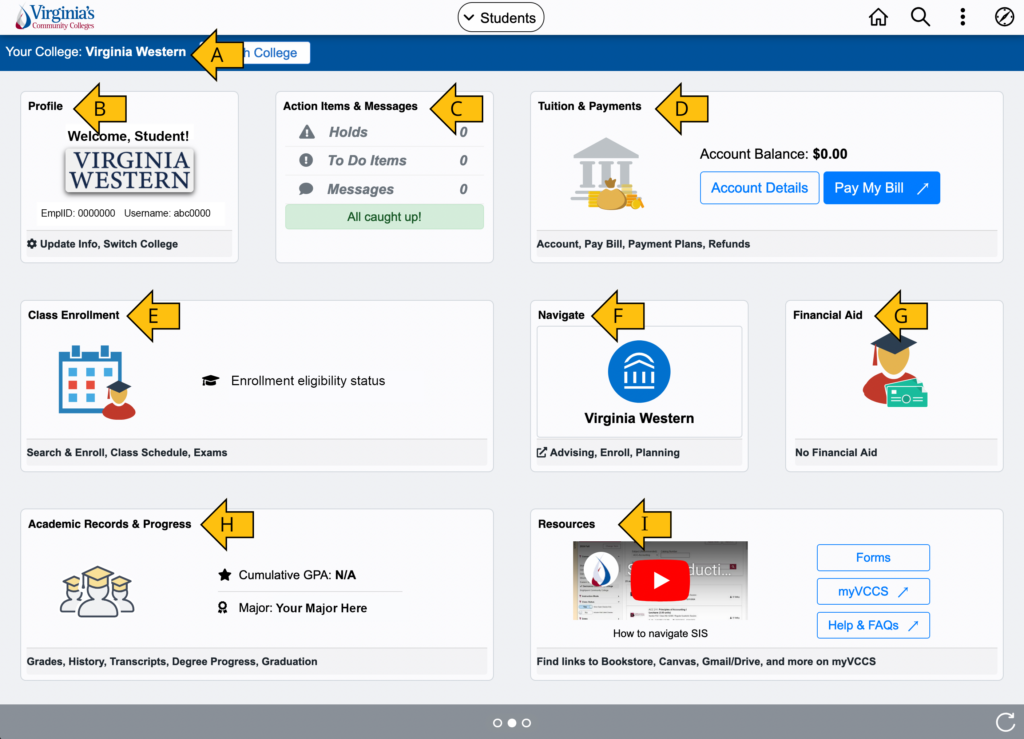
- Make sure your college shows as Virginia Western. Otherwise click Switch College to update it.
- Profile: Update your personal information such as your contact information and emergency contacts.
- Action Items & Messages: View holds and to-do list items. Items on your to-do list must be addressed to process financial aid.
- Tuition & Payments: Make payments, apply for a payment plan, and manage your refunds.
- Class Enrollment: Register for classes and view your class schedule.
- Navigate: Find links to Navigate where you can schedule an advising appointment.
- Financial Aid: View your financial aid award.
- Academic Records & Progress: View your academic requirements, grades, unofficial transcript and advisors. You can also apply for graduation.
- Resources: Find links to eforms and your MyVCCS homepage.
Paying for College
Our Financial Aid office assists with obtaining financial resources to support your educational goals.
Federal and state financial aid
- Complete the FAFSA: Visit studentaid.gov and click Apply Now to complete a Free Application for Federal Student Aid (FAFSA) as soon as you can. You will need a Federal Student Aid (FSA) ID to complete the FAFSA. This application needs to be completed each year. Federal School Code: 003760
- Check your VWCC email often: Important information and instructions will be delivered to you via your Virginia Western email account
- Additional information requests: Check your Message Center within the Student Center (see Technology Tools above) to respond to any financial aid requests needed to process your FAFSA and finalize your award.
Alternative financial aid option
Students who are nonimmigrants, undocumented, have Deferred Action for Childhood Arrivals (DACA) status or are otherwise ineligible to file the FAFSA can be considered for state financial aid through the VASA (Virginia Alternative State Aid Application) by visiting the SCHEV website.
Scholarships
The Virginia Western Community College Educational Foundation supports more than 85 scholarships for academic and accelerated skills training. Students are eligible to apply each spring for scholarships ($500 and up) to be awarded for the next academic year. Applications are generally open from March 1 to May 1 annually.
Payment options
If your award(s) do not fully cover your account balance, you must pay the balance by the payment deadline using one of our payment methods to avoid having your classes dropped during the enrollment cancellation period:
- Online via MyVWCC (Preferred Method)
- Tuition Payment Plan
- In person
For more information, visit Ways to Pay.
Registration is not complete until tuition is paid in full by the payment deadline.
Your Financial Aid
Virginia Western automatically applies your federal, state, and institutional financial aid to your tuition balance. To pay with approved financial aid, you must have received an Official Financial Aid Notification Letter from the Financial Aid Office. If you have a credit balance after meeting your financial obligations, you will be issued a refund.
To view your Financial Aid package:
- Log in to the SIS: Student Information System app (see Technology Tools above).
- Click Financial Aid.
- Click each individual aid type to view the aid amount by semester and general information for each aid type.
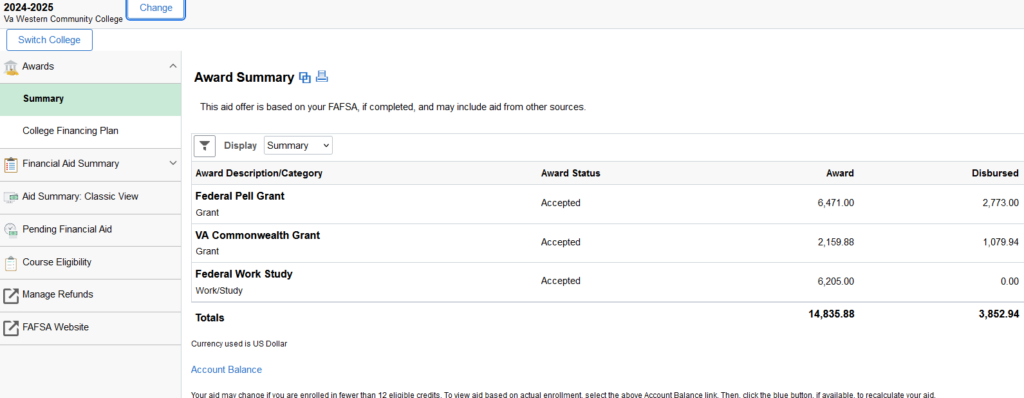
The Award Summary is the total amount you will receive for the year. The offer is based on full time enrollment. Adding and dropping classes may change your award amount.
To view your award based on enrollment:
- Log in to the SIS: Student Information System app (see Technology Tools above).
- Click Financial Aid.
- Click Pending Financial Aid on the left.
- Click the bar that says CLICK HERE to see Pending Financial Aid Based on Enrollment.
Virginia Western does not automatically package student loans. Learn more at the Financial Aid website.
You may be able to use your financial aid to purchase books and supplies from the college bookstore.
Frequently Asked Questions
How do I know when classes start?
The academic calendar can be found online.
When you view the calendar, the full semester (16-week) option will be the default display. If you are taking a 7-week or 5-week course, be sure to select that option. The academic calendar will display the following information for each timeframe:
- First/last day to enroll
- Last day to withdraw without a grade penalty
- Holidays and breaks
- Exams
- Last day to drop and receive a refund
- Commencement (Graduation — Spring only)
How do I view my class schedule?
- Log in to the Student Center (see Technology Tools above).
- Click Class Enrollment.
- Click View My Classes.
How do I view my textbooks?
- Go to the Virginia Western Bookstore website.
- Enter your student ID and click Enter.
How can I get academic support?
The Academic Link, housed in Brown Library, provides academic support to help students develop critical learning skills necessary for academic success. All academic support services are available to currently enrolled students for their Virginia Western courses at no cost. To make a tutoring appointment that fits your schedule, see the Navigate instructions in the Technology Tools section above.
The learning assistance services provided by the Academic Link include:
- 1-on-1 or group tutoring
- Academic Success Coaching
- STEM Center
- Brainfuse (24/7 for online tutoring)
- Writing Center
What are the computer expectations?
Students enrolled in online courses at Virginia Western are expected to have a laptop computer (or a desktop system with webcam and microphone) and high-speed internet access at home or another readily accessible location. Click here for a list of computer specifications.
A limited number of loaner laptops are available to current Virginia Western Community College students through Brown Library. These laptops are intended for students who have limited or no access to a computer when not on campus.
How do I know if school is closed?
For text alerts that include school closings and emergencies, text VWCC to 888777.
In the event of a delayed opening, please refer to the delayed opening class schedule available here.
How do I get a student ID?
Student IDs are available for your official identification as a Virginia Western student. Student IDs are not required to attend classes and can be obtained throughout the semester during open office hours. All students are encouraged to get a student ID to access benefits and services. The first student ID is free of charge for all students.
The Student ID offices are located in the Enrollment Center and Brown Library. Walk-ins are welcome; no appointment is needed. You’ll need:
- Government-issued proof of identification (driver’s license, DMV ID, passport or military ID)
- Copy of your schedule for the current academic term (print or electronic copy)
I want to transfer to a four-year school. When should I start that process?
It is never too early to think about transferring. Students should contact the transfer schools of their choosing EARLY to speak to a transfer admissions counselor. You can find a list of transfer resources, such as:
- Transfer guides (detail how various courses will transfer)
- Transfer events
- Guaranteed Admission Agreement (GAA), which guarantees that a Virginia Western student will be accepted to a specific four-year school when the student specific requirements are met.
Visit the Transfer Advising site to access transfer resources.
Why am I seeing additional fees for certain healthcare, skilled trades or agriculture courses?
To ensure you have access to industry-standard equipment, specialized labs and clinical resources, certain high-cost Career & Technical Education (CTE) courses now include a per-credit-hour fee starting in Fall 2026. These fees directly support the high-quality, authentic educational environment required to ensure you’re career-ready upon graduation. For more information on course fees please visit the VCCS Course Fees Explorer page.
Can I ride the bus to campus?
With a valid Virginia Western student, faculty or staff ID, you can ride the bus for free. Bus service is provided Monday through Friday each week. There is no weekend service. Bus service is not provided in between terms or when school is not in session. Visit the Student Life website for more information.
Do I need a parking pass? Where do I park?
Passes are not required to park on campus. Students should not park in spaces designated for Virginia Western faculty, staff or service vehicles. Parking in unauthorized areas will result in fines. View the campus map, parking areas and parking policies.
Is food available on campus?
Coffee 101 is located on the top floor of the Student Life Building. The Campus Bookstore is located in Duncan/Craig Hall and offers snacks, drinks, textbooks, apparel and more. Beverage vending machines are located in most campus buildings. Some buildings offer snack vending as well. Multiple options are available on the second floor of the Hall Family Center for Business Science next to the bridge access. Food trucks are also available. Visit Student Life for more information.