
To apply for graduation, you must be logged into MyVWCC and inside the Student Information System.
- Click on your Academic Records & Progress tile.

- Click Apply for Graduation on the left (near the bottom of the list).
- Verify all the information on the screen is correct, especially your address as this is where your diploma/certificates will be sent. All notifications about graduation will be sent to your VCCS student email. If your information needs to be corrected, click Update Address in the bottom right.
- If your information is correct, click the yellow Proceed with Making Application button.
- Select your Institution. If you have multiple institutions listed, choose VW286 Va Western Community College.
- Select the Term. The only term available will be the current term, except during the time both the spring and summer applications are available for summer students who wish to participate in the Commencement Ceremony. In this case, make sure you choose the correct term for your graduation.
- Summer 2026: 2263
- Fall 2026: 2264
- Spring 2027: 2272
- Click Continue. All of the plans you are enrolled in will appear.
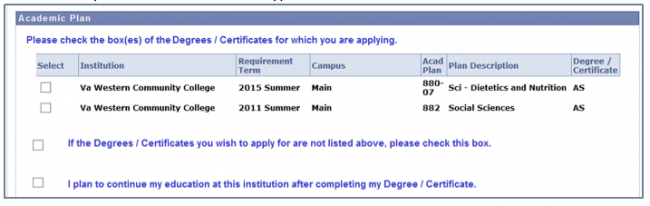
- Select any plans for which you are graduating from this term. In this example, the student is only graduating from one of their current plans. If the plan you wish to graduate from is not listed, check the box next to If the Degrees/Certificates you wish to apply for are not listed above, please check this box and complete a Program/Plan Change Form (PDF) to be submitted to your faculty advisor, program advisor, or through the Enrollment Center. You will be able to complete the graduation application, but it will NOT be processed until you submit the Program/Plan Change Form.
- Verify your name. The name that showed at the top of at the top of the graduation application is the name that will print on your diploma. Changing that information here will not reflect on your diploma. If this is not your current legal name, you will need to submit a Notification of Change Form (PDF) through the Enrollment Center.
- Complete the Questionnaire, checking all options that apply.
- Once your application is submitted, it cannot be changed without speaking to the Records Office. If you are ready to submit your application, click the box next to I Agree and the Submit button will appear. To submit your application, click Submit. You will receive a confirmation page. Check your VCCS student email on a regular basis for your application status and any other graduation information.
After You Apply
If you have not met your requirements for graduation, your faculty or program advisor will contact you.
After the deadline for graduation has passed, you will receive an email in your student email account with detailed information regarding cap & gown pickup, the graduation ceremony, and diploma pickup. Information can also be found on the Graduation website.